|
|
|
Navigating this site.
How to use the Shopping Cart.
|
|
|
|
|
|
|
|
|
|
|
These doors appear on the Introduction Page, at the entrance to each Collection, and in the Menu at the left side of the Item Pages. You may click on these doors at any time to enter the corresponding Collections.
|
|
|
|
|
|
Navigation Bar
|
| suburbanore.com |
Previous Item |
Next Item |
View Cart |
|
Clear Cart |
Checkout |
|
This Navigation Bar above is displayed on all Item Pages. The links in this bar will help you to navigate within a Collection. You will also use this Navigation Bar to keep track of the items you are interested in. We will explain each link in the Navigation Bar.
- suburbanore.com ------You will encounter this link here and in other places on the site. This link is your way back to the beginning of the site.
- Previous Item and Next Item -----These two links are your way of viewing the Item Pages in a Collection. You may travel in either direction through the Item Pages.
The next four links are for use with the Shopping Cart.
- View Cart -----This link takes you to your Shopping Cart . Once there you may review or delete items from your Shopping Cart at any time.
- Add to Cart -----Press this button and the item you are currently viewing will be added to your Shopping Cart .
- Clear Cart ----This link will clear all the items from your Shopping Cart.
- Checkout ----This link will take you to the Checkout Page. Here you will see a list of all the items currently in your Shopping Cart including prices and a subtotal. Payment and shipping policies are explained on this page. You will encounter a form on this page that request information about how to contact you. When completed and submitted, this infomation along with the items in your Shopping Cart are automatically emailed to us so we may respond to you as to availability and shipping cost.
|
|
|
|
|
View Cart Page:
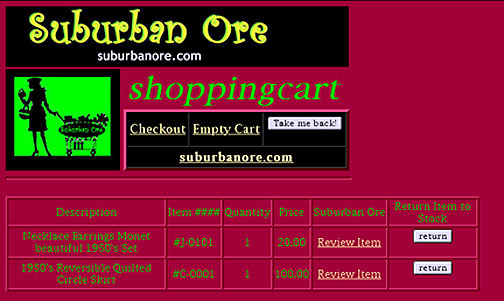
The image below is a sample of the View Cart Page. When you add and delete items from your shopping cart they appear here. With the links on this page you may:
- Checkout ----This link will take you to the Checkout Page. Here you will see a list of all the items currently in your Shopping Cart including prices and a subtotal. Payment and shipping policies are explained on this page. You will encounter a form on this page that request information about how to contact you. When completed and submitted this along with the items in your Shopping Cart are automatically emailed to us so we may respond to you as to availability, and shipping cost.
- Empty Cart ----This link will clear all the items from your Shopping Cart.
- Take Me Back ----This button appears here and on other pages. It is used to return to wherever you have just arrived from.
- suburbanore.com ------You will encounter this link here and in other places on the site. This link is your way back to the beginning of the site.
Below these links you will see a chart listing the items you have in your Shopping Cart with some information about them. At the far right after each item are two links.
- Review Item--- This link will return you to that Item Page so that you may review the item.
- Return--- This button will return only that individual item to stock and clear it from your Shopping Cart.
|
|
|
|
 |
|
|
|
|
|
|
|
|